

Latest major update also includes new stills page
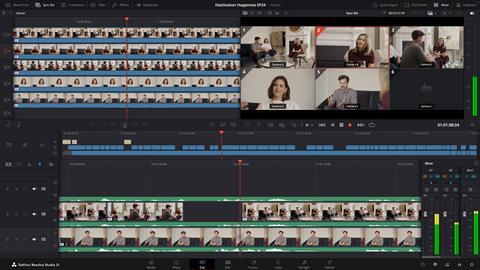
Blackmagic revealed DaVinci Resolve 21 at NAB 2026, with support for stills the major addition to the editing and grading software.
The major addition is a new Photo page, which allows for editing and grading stills, as well as manage and organise collections of stills and use many of the same Resolve tools that are available for video.
In addition, a number of AI tools have been added in Resolve 21, which is now in public beta. AI IntelliSearch finds specific objects or dialogue key words in content, including searching for people’s faces.
There is also an AI Speech Generator, which can create a unique voice from as little as a 10 second clip, with options to adjust speed, pitch and inflection. AI CineFocus can adjust aperture and focal range to change the depth of field of a shot and AI UltraSharpen can also be used to improve or fix slight focus errors, AI Face Age Transformer can change actors’ ages, and there are also AI Face Reshaper and AI Blemish Remover. AI Slate ID automatically detects the slate clapperboard details.
There are also many other additions, which you can see below.
DaVinci Resolve 21 Features
- New photo image editing now fully integrated within DaVinci Resolve.
- Support for DaVinci color control toolset and grading panels.
- Reframe and crop images at original source resolution and aspect ratio.
- LightBox view gives an overview of entire album with grades applied.
- Albums let you build, manage and tweak photos at source resolution.
- Direct image capture via Sony or Canon tethered cameras.
- Looks, LUTs, Resolve and Open FX for your images.
- Photo page is integrated with Blackmagic Cloud collaborative workflow.
- AI IntelliSearch lets you easily search for people or objects.
- AI Speech Generator transforms written text to spoken voice.
- AI CineFocus allows refocus with realistic bokeh and lens effects.
- AI Face Age Transformer lets you age or de-age a face.
- AI Face Reshaper for flexible reshape and resize of facial features.
- AI Blemish Removal to repair facial and skin blemishes.
- AI SlateID to read slate and populate clip metadata.
- AI UltraSharpen for high fidelity sharpening of moving images.
- AI Motion Deblur enables removal of common motion blur artifacts.
- Keyframing provides powerful retime controls with 4 point bezier.
- Fusion animation can be creatively driven by Fairlight audio.
- Native support for OGraf HTML graphics and Lottie animations.
- Spell checking, color fonts and Emoji for Text+ and MultiText.
- Smart bin views in Cut page.
- MultiMaster trim pass to grade single timeline to many deliverables.
- Render Magic Mask in place as an external matte.
- Node graphs can now be viewed as a layer list.
- Support for Krokodove motion graphics effects.
- New Macro Editor with inspector view and publishing to edit effects.
- Support for USD SDK 25.11 with Hydra 2.0 API for Storm renderer.
- Folder tracks allow a group of tracks to be folded down or expanded.
- Apple Immersive workflows now support foveated rendering.
- VR180 and VR360 deliver presets for Meta Quest and YouTube.
- Fusion adds Panomap immersive rotation and ILPD retargeting.
- Resolve FX Picture in Picture effect.
- IntelliScript supports Final Draft or plain text screenplay imports.
- Metadata panel supports star rating and tagging for clips.
“The new Photo page in DaVinci Resolve 21 brings Hollywood’s most advanced color tools to still photography for the first time,” said Grant Petty, Blackmagic Design CEO. “Professional colorists and photographers now have access to the full DaVinci color toolset and are able to build complex grades in a node based workflow that goes far beyond the layer based approach. They can also use all the DaVinci AI tools, ResolveFX and FusionFX and collaborate globally in real time. It’s going to be amazing to see creativity flourish with these tools”





No comments yet