

The Colorfront Immersive Utility app features pre-flight validation, GPU-accelerated preview, and automated encoding for Vision Pro content creation
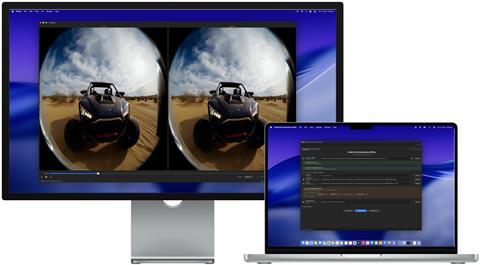
Colorfront has launched a macOS app that creates Apple Immersive Video files (.aivu) for playback on Apple Vision Pro.
The Colorfront Immersive Utility, takes in ProRes, MV-HEVC, and other standard video formats, pairs it with spatial audio and camera metadata, and outputs a single aivu file ready for distribution.
The app streamlines the process for preparing immersive video content for Apple Vision Pro. Users select a video file, a metadata file containing camera intrinsics, and an output directory. From there, you just click Create AIVU, and the app handles encoding, audio extraction, and packaging automatically.
“We built Colorfront Immersive Utility to put immersive video production into the hands of every type of creative, whether you’re a filmmaker, a documentarian, or a brand telling a story in a completely new medium,” said Mark Jaszberenyi, co-founder of Colorfront. “Apple Vision Pro has opened up an incredible storytelling canvas, and we wanted to expand access to these tools to as many creatives as possible. The entire pipeline runs on Mac devices with Apple silicon using Metal, so users can go from camera originals to a finished Apple Immersive Video experience.”
Before starting any encode, users can run Source PreCheck, a pre-flight validation tool that analyses video, audio, metadata, and timeline files for potential issues without beginning the creation process. PreCheck grades results by severity – errors that block AIVU creation, warnings worth reviewing, and informational notes.
After an AIVU file is created, the app can validate it with a GPU-accelerated light level analysis. The validation flags frames that exceed the 108-nit maximum brightness of the Apple Vision Pro display.
A built-in preview window provides real-time GPU-accelerated playback of the processed video. View modes include stereo (dual eye), single eye (left or right), and an immersive perspective view. Preview quality can be set to full, half, or quarter resolution.
Colorfront Immersive Utility is available today on the Mac App Store. It requires macOS 26.0 (Tahoe) or later, a Mac with Apple silicon (M1 or later required), and at least 16 GB of RAM (32 GB or more recommended for 8K content).



No comments yet